What Are Digital Work Instructions? Benefits & How to Choose



.webp)
published
September 13, 2026
Key Takeaways
Digital work instructions replace paper binders and static PDFs with interactive, step-by-step guidance delivered on tablets or screens at the point of work, reducing errors, accelerating onboarding, and creating automatic audit trails.
Human error causes 23% of manufacturing downtime and up to 80% of quality defects; digital work instructions address this by requiring step confirmation before operators can move forward.
Digital work instructions and digital SOPs serve different purposes — SOPs define the what, work instructions enforce the how — but modern platforms manage both in one system.
When evaluating software, prioritize platforms that work without IT support, integrate with your existing ERP/MES tools, and capture time-stamped compliance data automatically.
What Are Digital Work Instructions?
Digital work instructions provide frontline operators interactive, step-by-step guidance to help them perform tasks correctly and consistently. With detailed directions, illustrations, and interactive checklists about how to complete a task exactly where it's needed, digital work instructions can reduce human mistakes, speed learning, improve consistency, and boost quality and compliance.
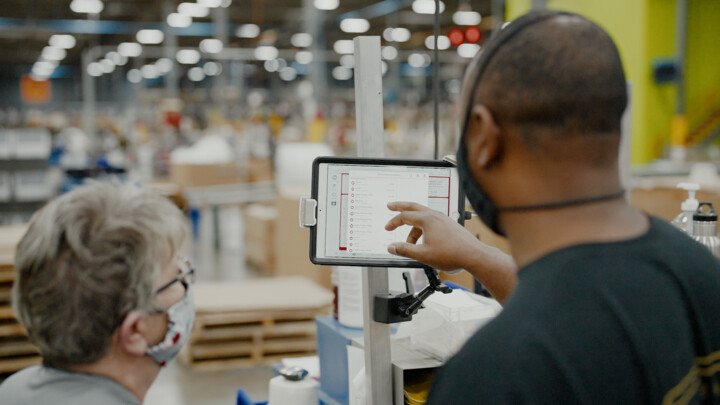
Digital work instructions are delivered using tablets, smartphones, or computers on the manufacturing line, replacing paper work instructions stored in binders and static PDFs on screens. Compared to static documents, digital instructions offer a more hands-on, dynamic way to guide employees through complex procedures.
Let's explore why digital work instructions work better than traditional work instructions, the difference between digital work instructions and SOPs, and what to look for in digital instructions software.
{{callout1}}
Why Manufacturers Are Moving Away From Paper
Most factories still run on static checklists and binder-based documentation — not because leaders don't see the problem, but because replacing paper has been disruptive. More than a third of manufacturing executives say their #1 concern is “equipping workers with the skills and knowledge they need to maximize the potential of smart manufacturing and operations,” according to a Deloitte study.
There are many reasons paperless work instructions are better than paper- or static PDF-based documentation for onboarding and upskilling frontline workers. Some include:
Documentation Accuracy
Achieving quality and compliance performance metrics means operators must consistently use up-to-date documentation. It's virtually impossible to ensure that every operator always uses current procedures when work instructions are buried in emails, binders, or workers' memories. Digital work instructions use version control to remove outdated instructions, so operators always have the right documentation.
Human Error
Paper-based work instructions are prone to human error, which accounts for 23% of downtime and up to 80% of quality defects in manufacturing. Digital work instructions can reduce errors by requiring operators to check off completed steps. A bonus: Digital checklists also ensure every worker on every shift consistently follows the same procedures — and create a digital audit trail documenting compliance.
Onboarding and Training
The manufacturing workforce is highly volatile: A quarter of operators are nearing retirement age, plus manufacturing turnover is 28% (compared to 13% overall), meaning expensive hiring and training never ends. (The Department of Labor estimates that replacing a worker costs 30% of their annual salary.) Digital work instructions make it easier and quicker to learn tasks compared to paper, because they walk frontline operators through each step. They also support younger, digital-native employees' learning styles, as they strongly prefer using technology over paper or face-to-face interactions.
Knowledge Capture and Distribution
As experienced operators retire, manufacturers are urgently trying to capture their legacy knowledge before it walks out the door. Trying to document their experience on paper is slow and manual, but it's fast and inexpensive to use a smartphone camera to video them demonstrating a process on the shop floor. Then you can quickly edit your digital work instructions with the video and immediately share them with frontline workers.
Key Benefits of Digital Work Instructions
With rich, interactive multimedia, 3D diagrams, and real-time updates, digital work instructions accelerate learning, reduce mistakes and waste, and automate audit trails.
Preventing Errors
Digital work instructions reduce mistakes by 20% to 60% across multiple industry studies, depending upon the process' complexity. Those errors show up later in rework or scrap. With interactive digital work instructions, employees must confirm task completion or scan parts to verify they're using the right ones, so they can't skip steps or use the wrong materials.
Enforcing Consistency Across Shifts and Lines
Similarly, systems that require confirmation and verification prevent workers on different shifts and lines from using "personal versions" of a process. Digital tools automatically capture time-stamped data that documents that frontline, maintenance, and other workers are following procedures correctly. This makes compliance a byproduct of everyday work, not an extra burden when the auditors are due.
Accelerating Onboarding and Assembly
Structured workflows in digital work instructions help employees learn and execute new procedures faster compared to workers using paper instructions. The effect is stronger for complex vs. simple tasks. Digital work instructions are also easier to create, update, and disseminate across all relevant lines and shifts than paper, so process changes get into workflows immediately.
Detecting Workflow Problems
When the data captured by these digital platforms is integrated into manufacturing productivity, maintenance, or reliability software, managers can use it to detect workflow problems and implement changes before they affect overall equipment effectiveness (OEE) and productivity. This data also helps shift leaders detect process deviations, so they can retrain operators if needed.
An agentic AI platform amplifies these benefits by analyzing and interpreting the data to autonomously execute workflows or guide operators to take the right next step to prevent problems.
Digital Work Instructions vs. Digital SOPs
Standard operating procedures (SOPs) and work instructions are different ways of describing a process or task, but manufacturers can't operate without both.
- SOPs are the what — high-level overviews that explain what a process does and why it's done. They include the roles, responsibilities, resources, and regulations involved in a process, but it doesn't get into the nitty-gritty details of how to do a task. They are used by people across an organization or department, who might not need the details on how it's done.
- Work instructions are the how — the step-by-step details that explain how to do a task. They often describe the task using text and graphics, and may include specific measurements or settings necessary to complete it correctly. They are used by people working on the task on the shop floor.
SOPs and work instructions have been part of Lean and Six Sigma for decades. Digital work instruction software is replacing paper SOPs and binders across the shop floor because the operational benefits apply to both.
{{callout2}}
What To Look for in Digital Work Instructions Software
Not all digital work instruction platforms are built for the shop floor. These questions separate tools designed for manufacturing operations from generic document management software.
- Can frontline supervisors edit or update work instructions without IT support?
- Is it difficult to embed videos or other multimedia into work instructions?
- Does the software integrate with your existing ERP, MES, OEE, and other tools?
- Can frontline workers access digital work instructions with smartphones or tablets directly on the shop floor?
- How does the software manage version control to ensure everyone has the current instructions?
- Does the software create audit trails (e.g., mandatory signoffs or material validation) to confirm operators are complying with work instructions?
- Does it include multilingual support?
- Does the software show where workers are getting stuck, so you can clarify work instructions?
- How long does it take before frontline workers can use digital work instructions?
The Bottom Line
The gap between your best and worst shift is often a documentation problem. Modern digital work instruction platforms close it by making the right process unavoidable and compliance automatic. Redzone's connected workforce platform is built specifically for the manufacturing floor to create a more informed, engaged workforce. Book a demo today to learn how we can help you standardize execution and capture real-time performance data from your frontline.

Frequently Asked Questions
What is the difference between a work instruction and an SOP?
A work instruction details the steps to complete a task. An SOP explains what to do and why at a high level.
Are digital work instructions the same as a PDF on a screen?
No. Digital work instructions are interactive electronic guides that show or highlight each step, potentially requiring operator confirmation, before moving to the next step. This helps reduce errors and enforce compliance. A PDF on a screen is no better than a paper work instruction — both are static documents.
Do digital work instructions help with compliance audits?
es, by requiring frontline operators to confirm tasks, digital work instructions automatically create audit trails to continuously document compliance with ISO, FDA, IATF, and other key regulations, with no additional work.
Can small and midsize manufacturers use digital work instructions?
Yes, any size manufacturer can replace paper manuals with digital work instructions. Modern, cloud-based software makes digitizing work instructions easier and more affordable for smaller plants.
How long does it take to do a digital work instruction transformation?
The time required for a digital work instruction transformation varies depending on its scope. Many companies can have frontline workers using digital instructions within weeks of a pilot.