How OEE, MES, and CMMS Work Together on the Manufacturing Floor
.webp)


published
October 5, 2026
Key Takeaways
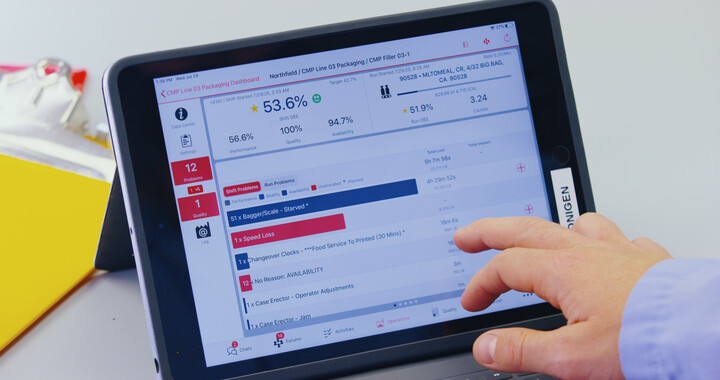
OEE software shows where your plant loses productive time and helps frontline teams act on those losses.
An MES manages, monitors, and controls production processes, tracking machine performance and work in progress in real time.
A CMMS organizes maintenance work, asset history, labor, and parts.
The three systems work together by passing the same production event data between teams, with each one adding different context.
Choose your first system based on your most urgent problem, then connect the others through software integrations.
OEE software, a manufacturing execution system (MES), and a computerized maintenance management system (CMMS) work together by sharing production, maintenance, and quality data. OEE software tracks overall equipment effectiveness (OEE) to show where a line loses productive time, while an MES runs production orders, and a CMMS manages maintenance. Your first investment should match the operational problem your plant most needs to solve.
What Are OEE Software, MES, and CMMS?
Each system manages a different part of daily operations. Before you compare them, it helps to know what each one does on its own.
What Is OEE Software and How Does It Work?
OEE measures how much of your planned production time is truly productive, using the formula OEE = Availability × Performance × Quality. Availability reflects operating time. Performance compares actual output with the line's target speed, and quality measures good output as a share of total output. OEE software collects machine data and calculates the number.
When you evaluate OEE tracking software for manufacturing, look for automatic downtime capture and reason codes operators can enter quickly. You'll also want analysis by line and shift, plus action tracking with clear owners. Redzone's guide to OEE in manufacturing explains the calculation and the most common production losses.
{{callout1}}
What Is a Manufacturing Execution System (MES)?
An MES manages, monitors, and controls production processes on the shop floor. It turns production plans into tasks for specific machines, lines, and operators, then tracks machine performance, work in progress, and process steps in real time.
An MES keeps detailed records of materials used, process steps, and operator actions, which support compliance. Redzone's guide to what an MES is covers its features and limitations.
What Does CMMS Mean?
CMMS stands for computerized maintenance management system, which is software that centralizes maintenance work and asset records. Your technicians use it for work orders, preventive maintenance schedules, labor tracking, parts inventory, and equipment history. Redzone's CMMS guide explains how a CMMS works in more detail.
With all three defined, the next step is to see how they differ when you line them up side by side. Each one serves a different team on a different timeline.
What Is the Difference Between OEE Software, MES, and CMMS Tools?
The main differences are the workflow each system owns and the people who rely on it. The table below compares them across purpose, users, data, workflows, time horizon, and outcome.
The table draws clean lines between the three systems. On a real production floor, though, they share more than their labels suggest.
How Do OEE, MES, and CMMS Software Connect During a Production Problem?
During a production problem, OEE software, MES, and CMMS connect by passing the same data to each team that needs to act on it. Each system adds a different piece of context, so your team sees the full picture of the problem instead of three partial views.
What Role Does Each System Play When a Line Stops?
Consider a filler that stops repeatedly during a shift. The OEE layer records the lost minutes and the reason code, which shows how much time the stops cost and what the operator saw.
The MES supplies the affected order, material lot, and procedure, so the team knows what was running. The CMMS provides the filler's maintenance history and manages the repair once a technician is assigned.
How Should Production, Maintenance, and Quality Data Move Between Systems?
Data should move through shared identifiers, event triggers, and status updates that reach the people who need them. Here's how information should move in the filler example.
- MES to OEE software: Schedules, orders, product definitions, and target speeds.
- OEE software to MES: Production counts and results for each order.
- OEE software to CMMS: Equipment stops that cross an agreed threshold that opens a work order.
- CMMS to operations: Work order status, so the line knows when the filler will be ready.
- Quality data to all three: Failed checks and defects linked to the same order and asset.
Use the same identifiers for sites, lines, assets, products, and orders in every system, and specify the system that owns each shared field. All three systems touch the same events, so some overlap is unavoidable.
Where Do OEE, MES, and CMMS Software Overlap?
OEE software, MES, and CMMS tools overlap wherever two systems record the same event. An MES may monitor machine performance and downtime, and a CMMS may log equipment failures that your OEE software also captures.
Overlap isn't a problem on its own. It becomes one when two systems record the same stop differently, or when no one knows which system owns that record.
Does a Plant Need OEE Software If It Already Has an MES?
Your plant may still need OEE software if your MES data stays mostly with engineers and supervisors instead of helping frontline teams act on losses during the shift. Check whether operators can categorize downtime without leaving their workflow.
Then check whether supervisors can track corrective actions from daily huddles, which are short meetings at the start of each shift. If your MES already does both well, a separate OEE layer may duplicate it, so evaluate workflows instead of product labels.
Because the systems overlap, asking which one is best won't help much. The more useful question is which problem your plant needs to solve first.
{{callout2}}
When Should a Plant Prioritize OEE, MES, or CMMS Software?
Invest first in the system that addresses your most urgent problem. Measure a baseline for that problem before implementation, so you can show whether the investment worked.
Production Visibility and Loss Reduction
Choose OEE monitoring software first when your supervisors can't see current performance or explain where production time goes. OEE software gives frontline teams live losses by line and shift, plus a way to assign actions against them. Start with a pilot on your bottleneck line and track downtime minutes and OEE.
Production Execution and Process Control
Choose an MES first when your plant needs to turn production plans into controlled tasks, track work in progress, and keep each run within engineered parameters. Complex, compliance-heavy operations such as pharmaceuticals, automotive, and aerospace often start here, along with highly automated continuous processes. Track schedule attainment and process deviations, plus the time it takes to trace a lot.
Maintenance Workflows and Asset Reliability
Choose a CMMS first when breakdowns, overdue preventive maintenance, or incomplete asset histories reduce uptime, and track work order completion and unplanned downtime as your baseline. Ask technicians to check how a CMMS candidate handles routine work orders on a mobile device to see that it is easy to use and builds complete records.
Once your first system is stable, the question shifts. You'll need to decide when your plant needs more than one.
When Does a Plant Need Two or All Three Systems?
A plant needs two or all three systems when its problems span more than one workflow. A plant with frequent breakdowns and little visibility into losses, for example, may need both OEE software and a CMMS. Your existing technology then shapes what comes next.
- ERP and MES already in place: An OEE layer can turn execution data into live loss information that frontline teams act on during the shift.
- OEE tracking in place, maintenance on spreadsheets: A CMMS is likely your next priority, since your OEE data already shows which equipment causes the most downtime.
- Regulated production without electronic traceability: An MES may need to come first, because those gaps create compliance risk.
- Paper records and spreadsheets only: Start with OEE tracking on one line if you can't yet say where production time goes. That data shows which problem to solve next.
- All three systems in place but disconnected: Connecting them will usually create more value than replacing any one of them.
In each case, a second or third system adds value only when it connects cleanly to the systems you already have. That raises the next decision, which is whether to connect an existing system or replace it.
When Does Integration Make More Sense Than Replacement?
Integration makes more sense when each existing system already performs its core job reliably. You shouldn't replace a system only because another platform overlaps with one of its features, since overlap alone doesn't create a workflow gap.
Keep an MES that already controls your processes reliably and a CMMS with useful asset history. Replace a system only when it can't support a workflow your plant needs, such as traceability that a new customer or regulator requires.
For most other gaps, a connected frontline layer can close them without disrupting the systems around it. That frontline layer is where a connected workforce solution fits.
Where Does Redzone Fit in Your Manufacturing Technology Stack?
Redzone works at that frontline layer, connecting production, maintenance, quality, training, and scheduling teams to live data from the systems around them. It's the #1 connected workforce solution for manufacturers, trusted by more than 2,000 factories.
Redzone Productivity provides real-time OEE tracking, and Redzone Reliability is CMMS software built on a total productive maintenance (TPM) foundation. Redzone Compliance connects quality checks and nonconformance tracking to the same production data. Should a problem arise, Redzone Scheduling helps teams adjust schedules based on what's really happening on the floor. Redzone complements your existing MES instead of replacing it, and it connects with ERP systems such as QAD, SAP, and Oracle through integrations and a REST API.
ChampionAI, the AI built into Redzone, analyzes equipment, line, and production data to recommend actions, while your people make the decisions. Every deployment includes coaching, so your frontline teams build these connected workflows into daily work.

Frequently Asked Questions
Can OEE software integrate with MES and CMMS?
Yes. OEE software can receive orders, schedules, and product data from an MES and return production results to it. With a CMMS, it can send equipment events and receive work order status back.
Do I need all three systems at the same time?
Not necessarily. Add each system when it addresses a documented gap. Complex or regulated plants may need all three, while other sites can begin with one and connect more later.
Can a CMMS calculate OEE?
Some CMMS platforms record equipment downtime, but OEE also needs production counts, target speed, and quality data. A complete OEE picture usually requires connecting maintenance data with production data.
How long should I run a pilot before expanding it?
Run your pilot until users follow the new workflow consistently and you've captured enough comparable production periods to evaluate. Define adoption measures, timelines, and operational outcomes before launch instead of choosing a review date and benchmarks at random.
Who should own the data shared between these systems?
Assign one owner to each shared field. Operations usually owns production data, maintenance owns asset data, and quality owns quality records, while IT manages the connections.